








Some links in this article may be affiliate links, which means we may earn a small commission at no extra cost to you. It never affects which tools we recommend. See our affiliate disclosure.
Starting a blog is one of the cheapest ways to build an online business. For the price of a domain and basic hosting, you get a platform you own, an asset that can grow in value, and several ways to earn from it: ads, affiliate links, your own products and services.
It’s also slower than most “make money blogging” posts admit. This guide walks through how to start a blog step by step, from choosing a niche to publishing your first posts, getting traffic and earning your first income, with honest timelines and costs along the way.
In this guide
- Can you still make money blogging?
- Step 1: Choose a profitable niche
- Step 2: Pick a domain name
- Step 3: Get hosting and install WordPress
- Step 4: Choose a theme and essential plugins
- Step 5: Create your essential pages
- Step 6: Write your first 10 posts
- Step 7: Get traffic
- Step 8: Monetise your blog
- What a blog really costs per year
- What building FinanceTock taught me about starting a blog
- Frequently asked questions
- The bottom line
⚡ The short version
- Pick a focused niche you can write about for years and that people search for.
- Register a domain and get hosting with one-click WordPress (roughly £40 to £150 for the first year).
- Install a fast theme and only the essential plugins.
- Create your About, Contact, Privacy and Disclaimer pages.
- Publish 10 genuinely helpful posts that answer real search questions.
- Start an email list on day one, then add affiliate links before ads.
Expect 6 to 12 months before search traffic picks up. The rest of this guide explains each step in detail.

Can you still make money blogging?
Yes, but the blogs that succeed today look different from those of ten years ago. Search engines and AI answers now reward content that shows real experience and genuinely helps the reader, and generic articles that rewrite what’s already out there struggle to rank.
What tends to work now:
- A focused niche where you can become a go-to resource, rather than writing about everything.
- First-hand experience: your own tests, results, photos, screenshots and opinions.
- Helpful, specific articles that answer a real question better than what already ranks.
- Owning your audience through an email list, so you aren’t dependent on a single traffic source.
⏳ An honest timeline
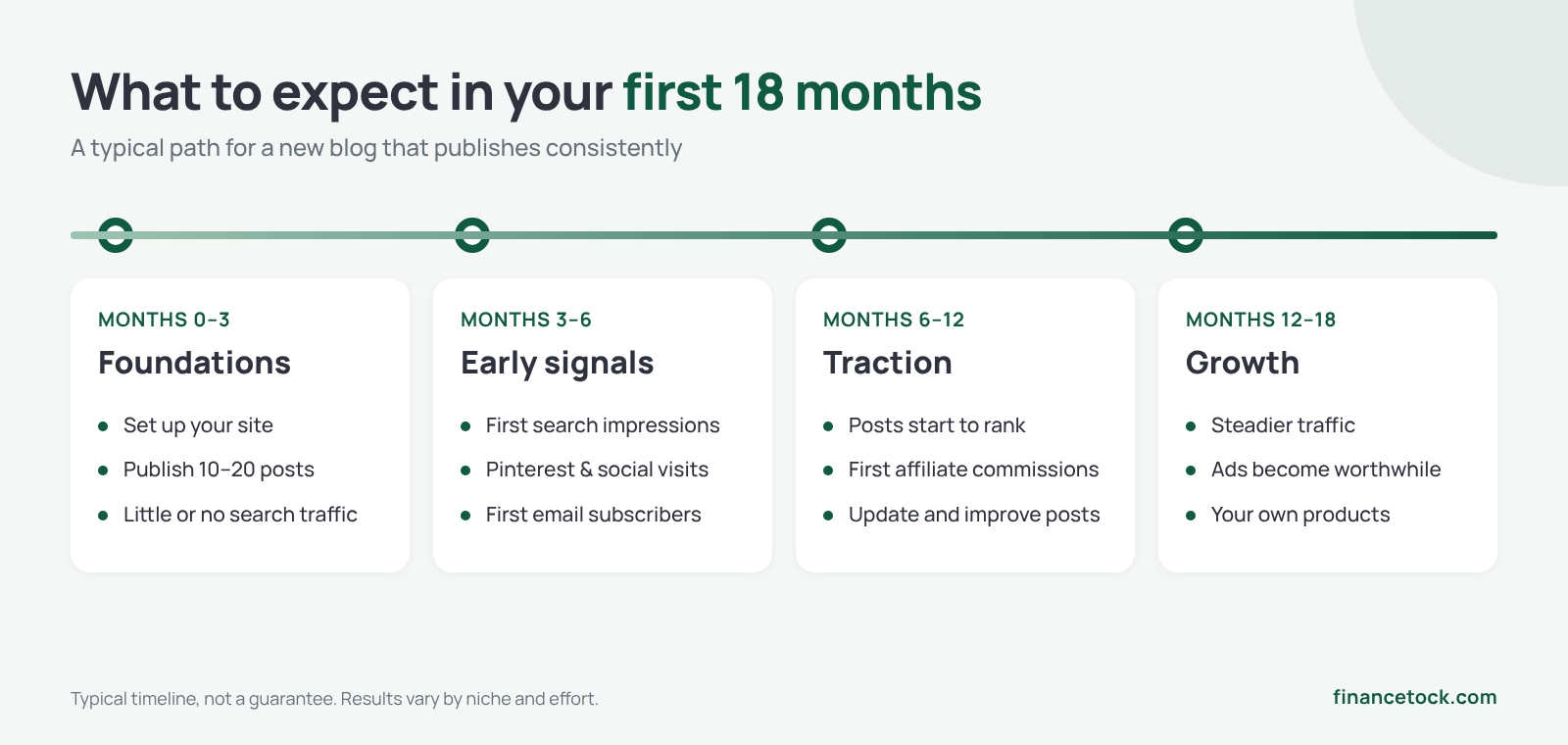
Most new blogs see little search traffic for the first 6 to 12 months. Many bloggers earn their first meaningful income somewhere between month 6 and month 18, usually from affiliate links before ads. It’s a long game, which is exactly why most people give up before it pays off.
Step 1: Choose a profitable niche
A good blog niche sits where three things overlap:
- You can write about it for years. Interest and experience make it far easier to keep publishing.
- People are searching for it. There should be plenty of questions people type into Google.
- There’s money in it. Products, services or software that readers buy, ideally with affiliate programmes.
Popular, profitable niches include personal finance, software and AI tools, home and DIY, food, travel, health and fitness, parenting and pets. Broad niches are crowded, so narrow them down: “budget travel for families”, not just “travel”; “AI tools for small businesses”, not just “technology”.
Before you commit, try listing 30 article ideas. If you struggle to reach 30, the niche may be too narrow or not interesting enough to you.
Step 2: Pick a domain name
Your domain is your blog’s address (like financetock.com). A few guidelines:
- Keep it short, memorable and easy to spell. Avoid hyphens and numbers.
- Leave room to grow. A name that’s too narrow (“bestairfryerreviews”) can box you in later.
- Prefer .com for a global audience, or .co.uk if you’re targeting the UK only.
- Check social handles are available on the platforms you plan to use.
- Avoid trademarks. Don’t build your brand on someone else’s name.
A domain usually costs around £10 to £15 ($10 to $20) a year. Many hosting plans include one free for the first year, but check the renewal price.
Step 3: Get hosting and install WordPress
To own your blog, you need web hosting (the server your site lives on) and WordPress, the free software that powers a large share of the web. Free platforms exist, but they limit how you can monetise and you don’t fully control your site.
For a new blog, shared or managed WordPress hosting is usually enough. Look for:
- One-click WordPress installation
- Free SSL certificate (the padlock in the browser)
- Automatic daily backups
- Built-in caching or a CDN for speed
- Clear renewal prices, not just the introductory deal
- Responsive support
Well-known hosts for beginners include GoDaddy, Bluehost, SiteGround, Namecheap and Hostinger. Hostinger is one of the most popular choices with new bloggers and is widely rated for value, largely because of the tools built into its platform: one-click WordPress installation, an easy-to-use control panel, free SSL, built-in caching, automatic backups and AI tools to help you set up your site. As always, compare renewal prices and what each plan includes before you sign up.
Our guide to choosing web hosting compares the main options and what to look out for.
Setting up WordPress, step by step
- Choose a hosting plan and register or connect your domain.
- Use the host’s setup wizard or one-click installer to install WordPress.
- Make sure SSL is active, so your site loads on https://.
- Log in to your dashboard at yourdomain.com/wp-admin.
- Under Settings, set your site title, time zone and permalinks (choose “Post name” for clean URLs).
- Delete the sample post, sample page and any plugins you won’t use.

Step 4: Choose a theme and essential plugins
Your theme controls how your blog looks. Choose one that is fast, mobile-friendly and regularly updated. Lightweight free themes such as Astra, Kadence and GeneratePress are popular starting points, and you can upgrade to a premium theme later if you need more layouts.
Start with a small set of essential plugins:
| What you need | Popular options |
|---|---|
| SEO | Yoast SEO, Rank Math, All in One SEO |
| Caching and speed | WP Rocket, W3 Total Cache, LiteSpeed Cache (on LiteSpeed servers) |
| Security | Wordfence, Solid Security, Really Simple Security |
| Backups | UpdraftPlus, or your host’s backups |
| Cookie consent | CookieYes, Complianz, Cookiebot |
| Contact form | WPForms, Contact Form 7 |
| Email sign-up | Kit (formerly ConvertKit), MailerLite, Brevo |
| Analytics | Site Kit by Google, or Google Analytics directly |
Fewer plugins is better. Each one adds code to maintain and can slow your site down, so only install what you actually use.
Step 5: Create your essential pages
Before you promote your blog, create these pages and link them in your footer:
- About: who you are, why readers should trust you and what the blog covers. This is one of your most-visited pages.
- Contact: a simple form or email address.
- Privacy policy: required if you collect any personal data, including analytics, comments or email sign-ups (UK GDPR in the UK; various state laws in the US).
- Cookie policy and consent banner: in the UK, non-essential cookies such as analytics and advertising need consent.
- Affiliate disclosure and disclaimer: needed once you use affiliate links or write about money, health or legal topics.
Ad networks and affiliate programmes often check for these pages before approving you.
Step 6: Write your first 10 posts
Your first posts should target questions your ideal readers are actually searching for. A simple keyword research process:
- Start with Google: type a topic and note the autocomplete suggestions and the “People also ask” questions.
- Use a free tool such as Google Keyword Planner, AnswerThePublic or the free versions of Ahrefs and Semrush to gauge demand.
- Look for “long-tail” keywords: specific phrases like “how to save for a house deposit in the UK” are easier to rank for than “saving money”.
- Check who ranks: if the first page is full of big brands, pick a more specific angle.
- Match search intent: if the top results are step-by-step guides, write a step-by-step guide.
A good mix for your first 10 posts: two or three in-depth “pillar” guides on your core topics, five or six specific how-to articles, and one or two comparison or “best of” posts that can earn affiliate income later. Link related posts to each other as you go.
✍️ From building FinanceTock
Don’t wait for a post to be perfect. A published article can always be improved later; an unpublished one helps nobody. I cover this and other lessons in what building FinanceTock taught me.
Using AI without hurting your blog
AI writing tools can speed up research, outlines and editing, but publishing unedited AI text is a fast way to blend in with everyone else. A practical workflow many bloggers use:
- Research: ask AI to list the questions beginners have about your topic, then check them against Google’s “People also ask”.
- Outline: ask for a draft outline, then reorder and cut it based on what you think matters most.
- Write the substance yourself: your examples, results, mistakes, photos and opinions are the parts readers and search engines value.
- Edit with AI: ask it to flag unclear sentences, repetition or missing steps, rather than rewrite everything in its own voice.
- Check every fact yourself, especially numbers, prices and rules, before you publish.
💬 Example prompt
“Here is my draft about [topic] for complete beginners. Don’t rewrite it. List any steps a beginner might find confusing, any claims I should double-check, and any obvious questions I haven’t answered.”
Our roundup of the best AI writing tools covers the main options, and our guide to AI tools lists others for images and productivity.
Step 7: Get traffic
Search engine optimisation (SEO)
Search is the main long-term traffic source for most blogs. The basics:
- Use your target keyword in the title, URL, first paragraph and a subheading.
- Write a clear meta description that makes people want to click.
- Use descriptive subheadings, short paragraphs and a table of contents for long posts.
- Add internal links between related posts, and compress images with descriptive alt text.
- Keep your site fast and mobile-friendly.
- Connect Google Search Console and submit your sitemap.
Pinterest and social media
Pinterest works like a visual search engine and can send traffic far sooner than Google, especially in niches like food, home, travel, personal finance and crafts. Pick one or two social platforms your readers actually use, and repurpose each post into a few short posts, pins or clips rather than trying to be everywhere.
An email list
Start collecting email addresses from day one, even with a simple sign-up form. Search rankings and social algorithms change, but your email list is an audience you own. A free download such as a checklist or template, like our printable ChatGPT prompt pack, gives readers a reason to subscribe.
✍️ From building FinanceTock
If I were starting again, I’d add an email sign-up from day one rather than waiting until traffic grew. Subscribers are an audience you keep, whatever happens to search rankings or social media algorithms.
Step 8: Monetise your blog
| Method | How it works | When it usually makes sense |
|---|---|---|
| Display ads | Earn per thousand page views from networks like Google AdSense | Once you have steady traffic; premium ad networks typically require tens of thousands of monthly visits |
| Affiliate marketing | Earn a commission when readers buy through your links | From early on, in reviews, comparisons and tutorials |
| Digital products | Sell templates, guides, printables or courses | Once you know what your audience needs |
| Services | Offer freelance work, coaching or consulting | Any time; the blog acts as your portfolio |
| Sponsored content | Brands pay for reviews or mentions | Once you have an engaged audience in a clear niche |
For most new blogs, affiliate links are the first meaningful income: they pay per sale, so a modest number of well-targeted readers can still earn. Ads pay per view, so they only add up once traffic grows. Our guide to affiliate marketing for beginners explains how it works and how to choose programmes.
Whatever you choose, disclose it clearly. In the UK, affiliate and sponsored content must be obviously identifiable as advertising under the ASA’s CAP Code, and in the US the FTC requires clear disclosure of affiliate relationships.
If you’d like to turn your writing skills into income while your blog grows, our guide to freelancing for beginners explains how to find your first clients, and ways to make money online covers more options.
What a blog really costs per year
| Item | Typical cost per year | Notes |
|---|---|---|
| Domain name | £10 to £15 ($10 to $20) | Often free for the first year with hosting |
| Hosting | £30 to £120 ($35 to $150) | Introductory deals are cheaper; check renewal prices. Budget-friendly hosts such as Hostinger sit at the lower end |
| Premium theme (optional) | £0 to £60 ($0 to $80) | Free themes are fine to start |
| Email marketing | £0 at first | Free plans cover your first subscribers |
| Premium plugins and tools (optional) | £0 to £200+ | Only once they earn their keep |
| Total to start | Roughly £40 to £150 ($50 to $190) | Your biggest investment is time |
You don’t need to spend much to start. Add paid tools only when a free option is clearly holding you back.
What building FinanceTock taught me about starting a blog
When I launched FinanceTock, I assumed the hardest part would be writing articles. It turned out that writing was only one piece of the puzzle. Building a blog that people actually find, trust and return to requires patience, consistency and a willingness to keep learning as you go.
Lesson 1: Publishing consistently matters more than perfection
One of my biggest mistakes early on was spending too much time trying to make every article perfect before hitting publish. I would tweak headings, rewrite sections and second-guess small details that most readers would never notice.
What I eventually realised is that a published article can be improved. An unpublished article helps nobody.
The blogs that grow are usually the ones that keep showing up week after week, even when traffic is low and progress feels invisible.
Lesson 2: Traffic takes longer than most people expect
If you’ve read enough blogging advice online, it can seem as though traffic appears overnight. That wasn’t my experience.
Many articles received very few visits when they were first published. Some took months before they started attracting meaningful search traffic. A few articles I expected to do well never gained traction, while others surprised me.
Blogging has taught me that results often arrive much later than the effort that created them.
Lesson 3: Real experience beats generic advice
As AI-generated content became more common, I noticed something important: readers respond far better to genuine experience than recycled information.
Anyone can summarise what already exists online. What readers really want to know is:
- What worked?
- What failed?
- What would you do differently?
- What happened when you actually tried it?
That’s why I’ve gradually moved towards sharing more of my own experiences, mistakes and lessons learned rather than simply explaining concepts.
Lesson 4: AI is a powerful assistant, not a replacement
I regularly use AI tools to help organise ideas, improve drafts and speed up research.
What I’ve learned, however, is that AI works best when it helps you create content, not when it creates the content for you. The articles that perform best are usually the ones where I add personal insights, examples and opinions that no AI tool can generate on its own.
AI can make you faster. It cannot replace your experience.
Lesson 5: Your email list is more valuable than your traffic
Early on, I focused almost entirely on page views.
Over time, I realised that an email subscriber is far more valuable than a casual visitor. Search rankings change. Social media algorithms change. An email list gives you a direct connection to people who actually want to hear from you.
If I were starting again today, I would focus on building an email list from day one rather than waiting until traffic increased.
Lesson 6: Small improvements compound
The biggest surprise has been how much progress comes from small actions repeated consistently.
Improving one article. Learning one new skill. Sending one email. Publishing one more post.
None of those things feel significant on their own, but over months and years they begin to compound in ways that are hard to appreciate when you’re just getting started.
🤔 Worth thinking about
If I had to give one piece of advice to a new blogger, it would be this: build for the person you’ll be in two years, not the traffic you’ll get next week.
Most blogs fail because their owners quit before the results arrive. The people who eventually succeed are rarely the smartest, luckiest or most talented. They’re usually the ones who keep publishing, keep learning and stay around long enough for their efforts to compound.
FinanceTock is still a work in progress, but that may be the most important lesson of all: successful blogs are built one useful article at a time.
Sources and further reading
- Google Search Central: SEO Starter Guide
- Google Search Central: Creating helpful, reliable, people-first content
- ICO: Guide to PECR (cookies and email marketing)
- ASA: Affiliate marketing
- FTC: Disclosures 101
Last checked: November 2026.
Frequently asked questions
How much does it cost to start a blog?
Most people can start a self-hosted WordPress blog for roughly £40 to £150 ($50 to $190) in the first year, covering a domain and hosting. Themes, email tools and plugins all have free options to begin with.
How long does it take to make money blogging?
Many blogs earn little in the first six months. With consistent publishing, first affiliate income often arrives somewhere between months 6 and 18, and meaningful ad income usually takes longer because it depends on traffic.
Do I need to be an expert to start a blog?
No, but you need experience or a willingness to learn in public. Documenting what you’re trying, testing and learning can be valuable content in itself.
Is WordPress the best platform for a blog?
Self-hosted WordPress is the most popular choice for blogs that aim to make money because you own your site and can use any ads, affiliates or products. Hosted platforms are simpler but more limited.
How often should I post?
Consistency matters more than volume. One or two genuinely helpful posts a week, kept up for months, usually beats a burst of rushed posts.
Can I use AI to write my blog posts?
You can use AI to help with research, outlines and editing, but search engines and readers value original, experience-based content. Edit heavily, check facts and add your own insights.
The bottom line
Starting a blog is cheap; building one that makes money takes patience. Choose a niche you can stick with, set up WordPress on reliable hosting, publish genuinely helpful posts consistently, start an email list early and monetise with affiliate links before ads.
Treat the first year as building the foundations. The bloggers who succeed are rarely the most talented writers; they’re usually the ones who keep going long enough for the work to compound.
This article is for general information only. Costs, platform requirements and rules change; check current terms before you sign up. Read our disclaimer.


